Pexlora
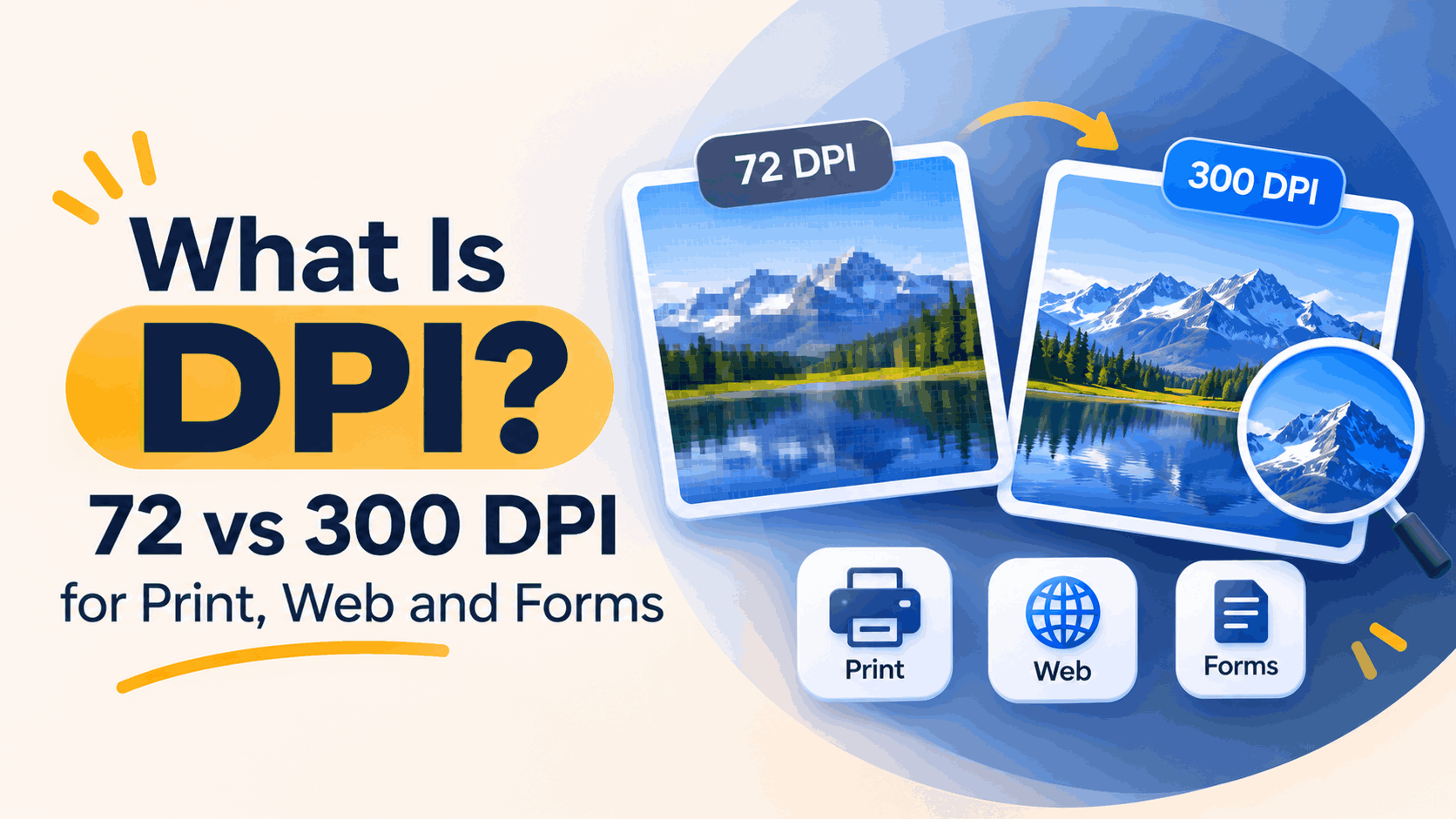
What Is DPI? 72 vs 300 DPI for Print, Web and Forms
DPI confuses almost everyone. Learn what DPI really controls, why 72 vs 300 DPI doesn't matter on screens, when it matters for printing, and how to set it for forms.

6 min read
On this page
A print shop asks for a "300 DPI file". An application form wants your photo "at 200 DPI". Someone online insists web images must be 72 DPI. You open your photo's properties, see 96 DPI, and have no idea whether that's good or bad.
Here's the short version: DPI only matters when an image is printed on paper. On a screen, two images with the same pixel dimensions look identical whether they're tagged 72 DPI or 300 DPI. Once that clicks, most of the confusion disappears, and you can give printers and forms exactly what they ask for in a few seconds.
This guide explains what DPI actually controls, how to work out print sizes from pixels, why the 72 DPI rule for the web is a myth, and how to set DPI correctly for printing and online forms.
What DPI actually means
DPI stands for dots per inch. Strictly, it describes how many dots of ink a printer lays down in an inch. For digital images, people use it loosely to mean PPI, pixels per inch: how many of the image's pixels should fit into one inch of paper when printed.
The crucial point is that a DPI value is just a note stored in the file. It doesn't add or remove pixels. A photo that's 3000 pixels wide is 3000 pixels wide whether the note says 72 or 300. What changes is the physical size the image prints at by default.
Adobe's guide to image size and resolution explains the same idea: pixel dimensions set the amount of detail, and resolution decides how that detail is spread across paper.
DPI, PPI and megapixels: how they fit together
Three terms get mixed up constantly. Megapixels describe how many pixels an image has in total. A 12-megapixel phone photo is about 4000 × 3000 pixels. PPI describes how densely those pixels are spread on paper. DPI, in the printer's sense, describes how many ink dots the printer uses to reproduce them.
For everyday purposes, treat DPI and PPI as the same thing, because that's how forms, print shops and most software use them. The number that really limits what you can do is the pixel count. More pixels give you the freedom to print larger at a high DPI. Fewer pixels mean you have to choose between a small sharp print and a large soft one.
The one formula you need
Print size is simply pixels divided by DPI.
Print width (inches) = width in pixels ÷ DPI
Print height (inches) = height in pixels ÷ DPI
Take a 3000 × 2000 pixel photo:
| DPI setting | Print size | Looks like |
|---|---|---|
| 72 | 41.7 × 27.8 inches | A huge poster, but soft up close |
| 150 | 20 × 13.3 inches | Good for a large print viewed from a distance |
| 300 | 10 × 6.7 inches | Sharp, close-up photo quality |
Same file, same pixels. Only the print size changes. At 300 DPI, the pixels are packed tightly, so the print looks crisp. At 72 DPI, they're spread out, so the print is large but less sharp up close.
Why 72 DPI for the web is a myth
The "72 DPI for web" rule comes from early Apple Macintosh screens, which displayed roughly 72 pixels per inch. Designers learned that a 72 DPI image would show at its "real" size on those monitors, and the advice stuck around for decades.
Modern screens vary wildly, from around 100 pixels per inch on a budget laptop to over 400 on a flagship phone. Browsers ignore the DPI note completely. They only look at pixel dimensions and the size you set in your HTML or CSS.
So for websites, social media and email, don't worry about DPI. Focus on pixel dimensions and file size instead. Our image SEO checklist covers the dimensions that actually matter online.
When DPI really matters: printing
For anything printed, DPI and pixels together decide whether the result looks sharp.
- Photos and flyers viewed up close: aim for 300 DPI at the final print size.
- Posters and banners viewed from a few feet away: 150 DPI is usually enough.
- Large hoardings viewed from the road: much lower values work because nobody stands close.
- Passport photos: 300 DPI at the exact required size, such as 35 × 45 mm. Our guide to making passport photos at home shows the pixel numbers.
The thing that can't be faked is pixel count. If you need a sharp 10 × 8 inch print at 300 DPI, you need roughly 3000 × 2400 pixels. Setting a 600-pixel image to 300 DPI only makes it print at 2 inches wide. Stretching it bigger with resampling adds pixels, but it can't add real detail, so it looks soft.
DPI requirements on online forms
Some government and exam forms ask for a specific DPI, such as 200 DPI, alongside pixel dimensions and a KB limit. The portal may check the DPI value stored in the file and reject anything that doesn't match.
Since DPI is just a stored note, fixing this is quick:
- Resize your photo to the required pixel dimensions first.
- Open Change DPI and enter the value the form asks for.
- Download the file. Its pixels are untouched, but the DPI note now matches the form.
- Check the file size is still within the KB limit, and compress if needed.
The Photo & Signature Resizer can handle pixels and file size together for exam forms.
A worked example
A print shop asks for a 6 × 4 inch photo at 300 DPI. Multiply each side by 300 and you get 1800 × 1200 pixels. Your phone photo is 4000 × 3000, so you have more than enough detail.
Crop it to a 3:2 shape so it matches 6 × 4, resize it to 1800 × 1200, and set the DPI to 300. When the shop opens the file, their software reads 6 × 4 inches at 300 DPI, exactly what they asked for, and the print comes out sharp with no surprises.
If your photo had been only 900 × 600 pixels, you'd still be able to tag it 300 DPI, but it would print at 3 × 2 inches. Forcing it to 6 × 4 would mean either a soft print or stretched pixels.
Frequently asked questions
Is 300 DPI better than 72 DPI?
For printing, yes, because it packs pixels more tightly and gives sharper prints. On screens, there's no difference at all between the two when the pixel dimensions are the same.
Does changing DPI reduce quality?
Not if you only change the DPI value. Quality changes only when software resamples the image, adding or removing pixels.
What DPI should I use for Instagram?
It doesn't matter. Instagram and other platforms only use pixel dimensions. Focus on uploading at the recommended pixel size.
How do I check the DPI of an image?
On Windows, right-click the file, choose Properties, then the Details tab. On a Mac, open it in Preview and use Tools, then Show Inspector. You can also see it in a metadata viewer.
Remember the formula
Next time someone asks for a DPI value, divide your image's pixels by it to see the print size. If that size works, set the DPI and you're done. If it's too small, you need a bigger original, not a bigger number.